Introduction to Reinforcement Learning in Generative AI
Reinforcement Learning (RL) is a type of machine learning where an agent learns to make decisions by taking actions in an environment to maximize cumulative rewards. When applied to generative AI,…
What is Reinforcement Learning in Generative AI?
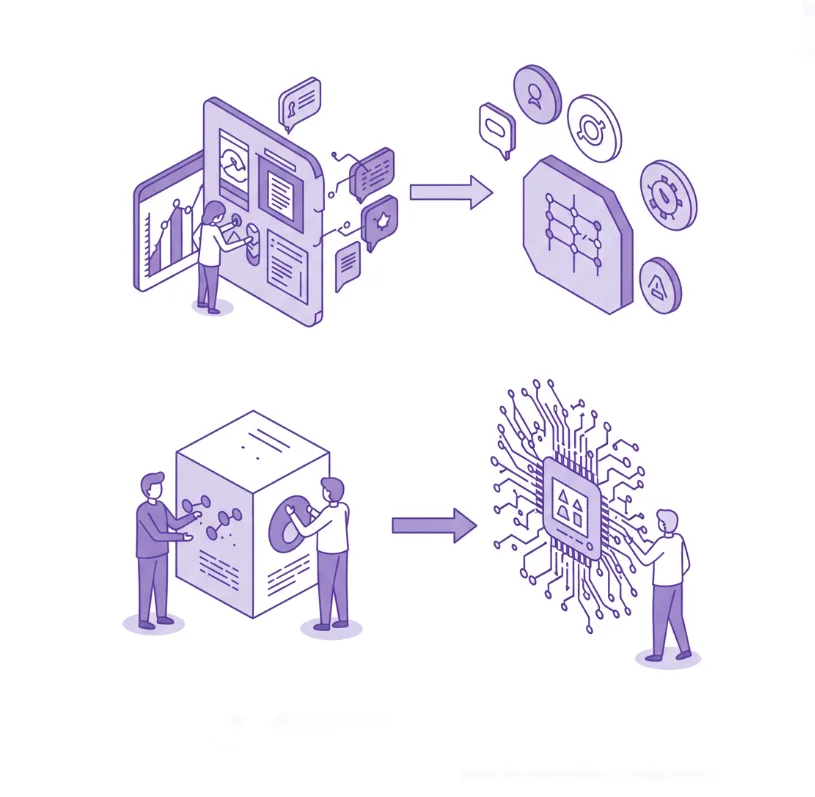
Reinforcement Learning (RL) is a type of machine learning where an agent learns to make decisions by taking actions in an environment to maximize cumulative rewards. When applied to generative AI, this approach is called Reinforcement Learning from Human Feedback (RLHF) or Reinforcement Learning with AI Feedback (RLAIF).
Why Use Reinforcement Learning for Generative AI?
Traditional supervised learning has limitations when training generative models:
- Alignment Problem: Models trained purely on prediction may generate harmful, biased, or incorrect content
- Preference Learning: Hard to capture human preferences through supervised learning alone
- Context Sensitivity: Standard supervised learning doesn’t account for varied contexts where different responses are appropriate
RLHF addresses these issues by incorporating direct feedback on generated outputs to align the model with human preferences.
Core Components of RLHF
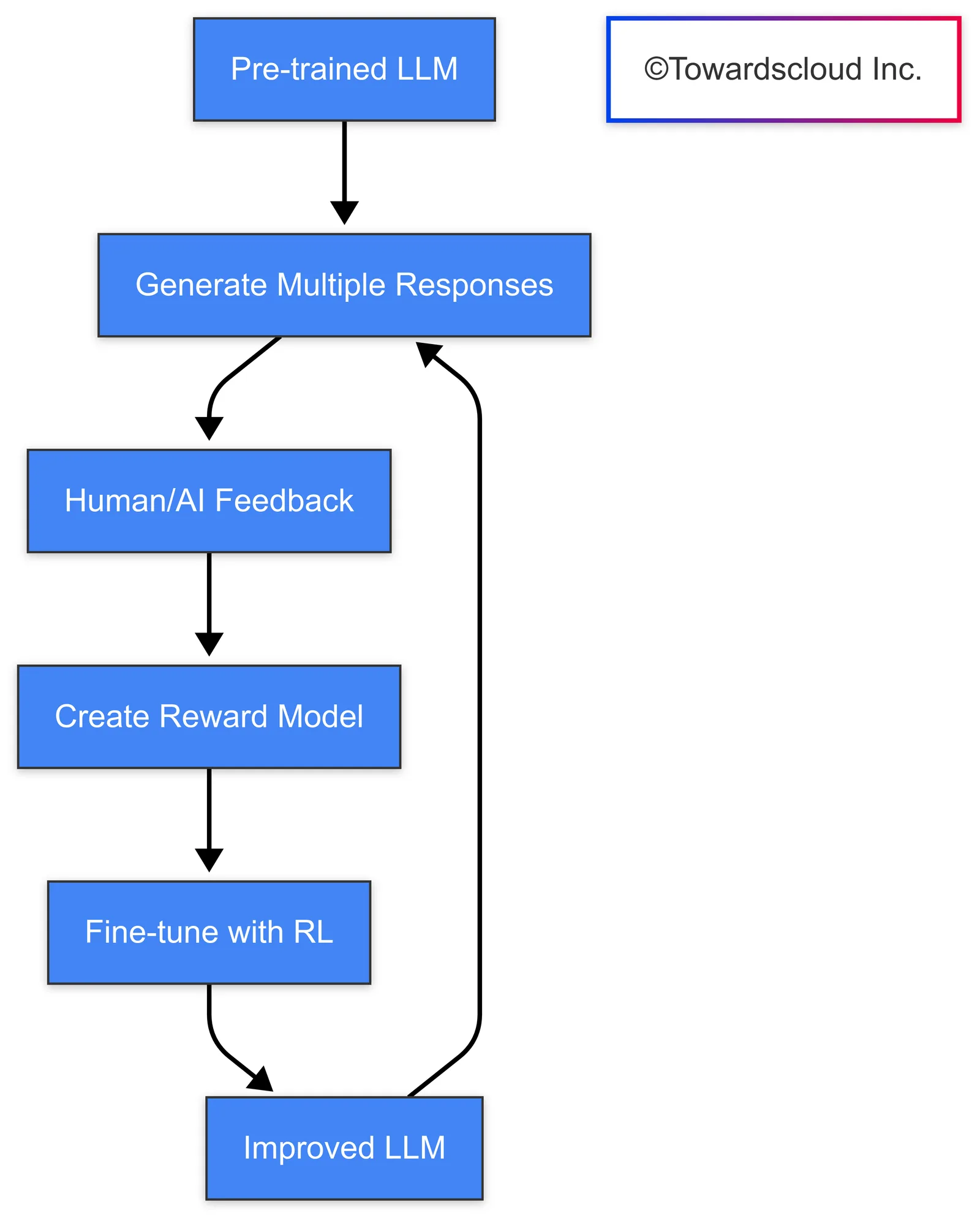
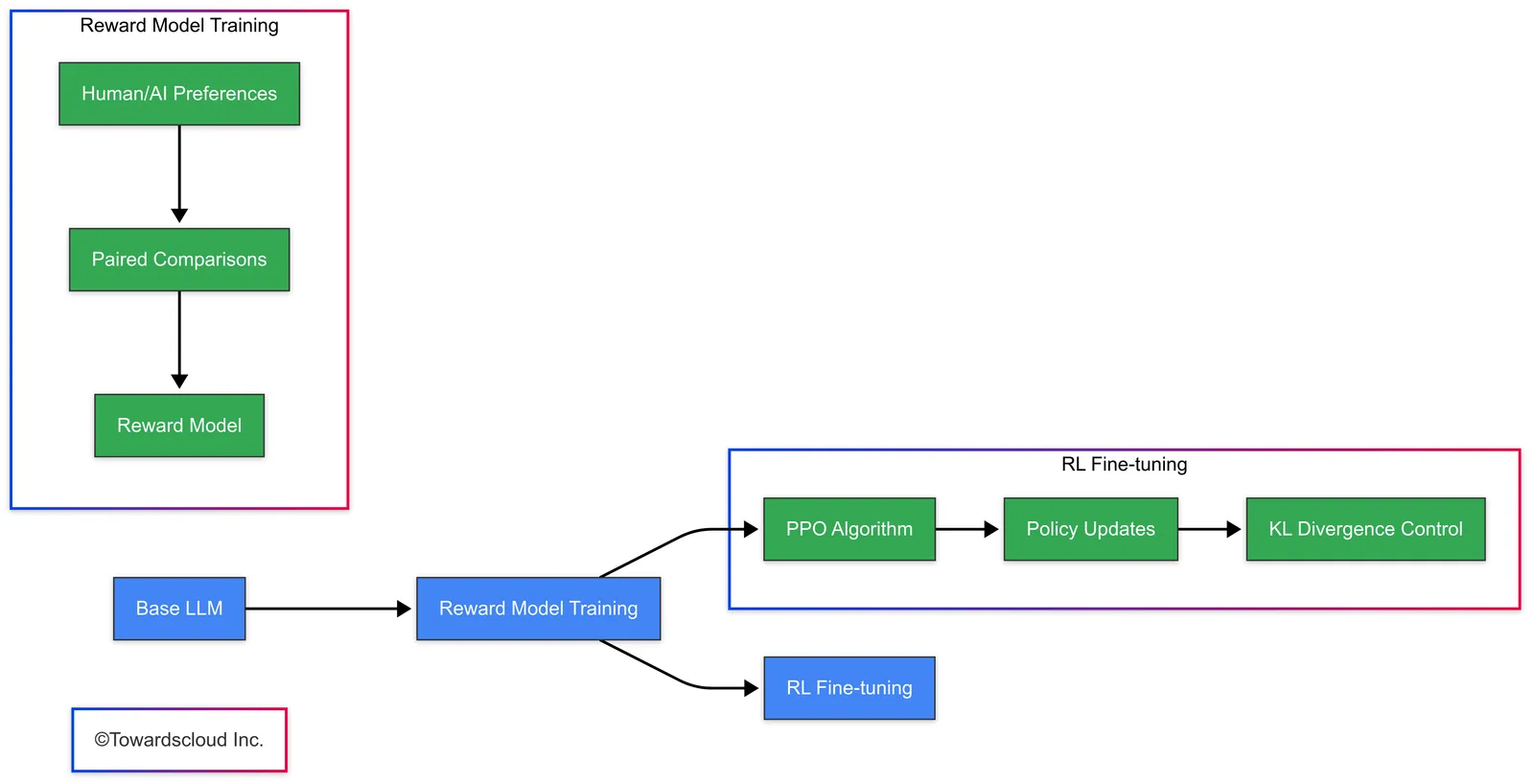
1. Base Model
Start with a pre-trained language model (like GPT, PaLM, Claude, or Llama).
2. Reward Model
Train a model to predict human preferences between different outputs.
3. RL Optimization
Fine-tune the model using RL algorithms (typically Proximal Policy Optimization - PPO).
Implementation for “Word Up! Bot”
Let’s build a simple text enhancement bot using RLHF. Our bot will improve user-provided text by making it more engaging, clear, and grammatically correct based on reinforcement learning.
Independent Implementation
First, let’s look at a Python implementation without cloud-specific features:
Word Up! Bot - Python Implementation
import torch
import torch.nn as nn
import torch.optim as optim
from transformers import GPT2LMHeadModel, GPT2Tokenizer
import numpy as np

class WordUpBot:
    def __init__(self, model_name="gpt2-medium"):
        # Base language model
        self.tokenizer = GPT2Tokenizer.from_pretrained(model_name)
        self.base_model = GPT2LMHeadModel.from_pretrained(model_name)

        # Reward model (using a simple classifier head on top of the LM)
        self.reward_model = nn.Sequential(
            nn.Linear(self.base_model.config.n_embd, 1),
            nn.Sigmoid()
        )

        # Optimizers
        self.policy_optimizer = optim.Adam(self.base_model.parameters(), lr=1e-5)
        self.reward_optimizer = optim.Adam(self.reward_model.parameters(), lr=1e-4)

    def generate_responses(self, prompt, n=4, max_length=50):
        """Generate multiple responses for a given prompt"""
        input_ids = self.tokenizer.encode(prompt, return_tensors="pt")

        responses = []
        for _ in range(n):
            # Different temperature for diversity
            temp = 0.7 + (np.random.rand() * 0.6)  # Temperature between 0.7 and 1.3

            output = self.base_model.generate(
                input_ids,
                max_length=max_length,
                temperature=temp,
                do_sample=True,
                top_p=0.9,
                num_return_sequences=1
            )

            response = self.tokenizer.decode(output[0], skip_special_tokens=True)
            responses.append(response)

        return responses

    def train_reward_model(self, prompt_pairs, preferred_indices, epochs=5):
        """Train the reward model on pairs of responses with human preference labels"""
        criterion = nn.BCELoss()

        for epoch in range(epochs):
            total_loss = 0

            for (prompt_a, prompt_b), preferred_idx in zip(prompt_pairs, preferred_indices):
                # Encode both responses
                encoded_a = self.tokenizer.encode(prompt_a, return_tensors="pt")
                encoded_b = self.tokenizer.encode(prompt_b, return_tensors="pt")

                # Get embeddings from the base model
                with torch.no_grad():
                    output_a = self.base_model(encoded_a, output_hidden_states=True)
                    output_b = self.base_model(encoded_b, output_hidden_states=True)

                # Use the last hidden state's final token embedding
                embedding_a = output_a.hidden_states[-1][:, -1, :]
                embedding_b = output_b.hidden_states[-1][:, -1, :]

                # Get reward predictions
                reward_a = self.reward_model(embedding_a)
                reward_b = self.reward_model(embedding_b)

                # Create target: 1 if A is preferred, 0 if B is preferred
                target = torch.tensor([[1.0]]) if preferred_idx == 0 else torch.tensor([[0.0]])

                # Calculate loss (probability that A is better than B)
                prob_a_better = reward_a / (reward_a + reward_b)
                loss = criterion(prob_a_better, target)

                # Backward and optimize
                self.reward_optimizer.zero_grad()
                loss.backward()
                self.reward_optimizer.step()

                total_loss += loss.item()

            print(f"Epoch {epoch+1}/{epochs}, Loss: {total_loss:.4f}")

    def ppo_update(self, prompts, n_iterations=100, batch_size=4):
        """Update the policy model using PPO"""
        for i in range(n_iterations):
            prompt_batch = np.random.choice(prompts, size=batch_size)

            for prompt in prompt_batch:
                # Generate responses with current policy
                responses = self.generate_responses(prompt, n=2)
                old_response, new_response = responses

                # Tokenize
                old_tokens = self.tokenizer.encode(old_response, return_tensors="pt")

                # Get log probs of old response under current policy
                with torch.no_grad():
                    outputs = self.base_model(old_tokens, labels=old_tokens)
                    old_log_probs = -outputs.loss

                # Generate new response
                new_tokens = self.tokenizer.encode(new_response, return_tensors="pt")

                # Calculate rewards using reward model
                with torch.no_grad():
                    old_output = self.base_model(old_tokens, output_hidden_states=True)
                    new_output = self.base_model(new_tokens, output_hidden_states=True)

                    old_embedding = old_output.hidden_states[-1][:, -1, :]
                    new_embedding = new_output.hidden_states[-1][:, -1, :]

                    old_reward = self.reward_model(old_embedding)
                    new_reward = self.reward_model(new_embedding)

                # If new response has higher reward, update policy
                if new_reward > old_reward:
                    # Forward pass for new response
                    outputs = self.base_model(new_tokens, labels=new_tokens)
                    new_log_probs = -outputs.loss

                    # Calculate PPO ratio
                    ratio = torch.exp(new_log_probs - old_log_probs)

                    # Calculate clamped objective
                    epsilon = 0.2  # PPO clip parameter
                    advantage = new_reward - old_reward

                    obj1 = ratio * advantage
                    obj2 = torch.clamp(ratio, 1-epsilon, 1+epsilon) * advantage
                    policy_loss = -torch.min(obj1, obj2)

                    # KL penalty to prevent divergence
                    kl_penalty = 0.1 * torch.abs(new_log_probs - old_log_probs)
                    total_loss = policy_loss + kl_penalty

                    # Update policy
                    self.policy_optimizer.zero_grad()
                    total_loss.backward()
                    self.policy_optimizer.step()

            if (i+1) % 10 == 0:
                print(f"PPO Iteration {i+1}/{n_iterations}")

    def enhance_text(self, text):
        """Enhance user text using the trained model"""
        prompt = f"Enhance this text: '{text}'\nImproved version:"

        input_ids = self.tokenizer.encode(prompt, return_tensors="pt")
        output = self.base_model.generate(
            input_ids,
            max_length=len(input_ids[0]) + 100,
            temperature=0.7,
            top_p=0.9,
            do_sample=True,
            num_return_sequences=1
        )

        enhanced = self.tokenizer.decode(output[0], skip_special_tokens=True)
        # Extract just the improved part
        return enhanced.split("Improved version:")[-1].strip()

# Example usage:
if __name__ == "__main__":
    # Initialize the bot
    bot = WordUpBot()

    # Example prompts and preferences for training the reward model
    prompt_pairs = [
        ("The weather is bad today.", "Today's weather is quite unfavorable, limiting outdoor activities."),
        ("I like pizza", "I'm particularly fond of pizza, especially with fresh toppings and a crispy crust."),
        ("The meeting is at 10", "The important meeting has been scheduled for 10 AM in the conference room.")
    ]

    # Index 1 means the second response is preferred in each pair
    preferred_indices = [1, 1, 1]

    # Train the reward model
    bot.train_reward_model(prompt_pairs, preferred_indices)

    # Train the policy with PPO
    prompts = ["Enhance this text:", "Make this better:", "Improve this writing:"]
    bot.ppo_update(prompts, n_iterations=50)

    # Use the bot to enhance text
    original_text = "The car is red and it goes fast"
    enhanced_text = bot.enhance_text(original_text)

    print(f"Original: {original_text}")
    print(f"Enhanced: {enhanced_text}")
Cloud Implementations Comparison
AWS Implementation
AWS Implementation - WordUpBot
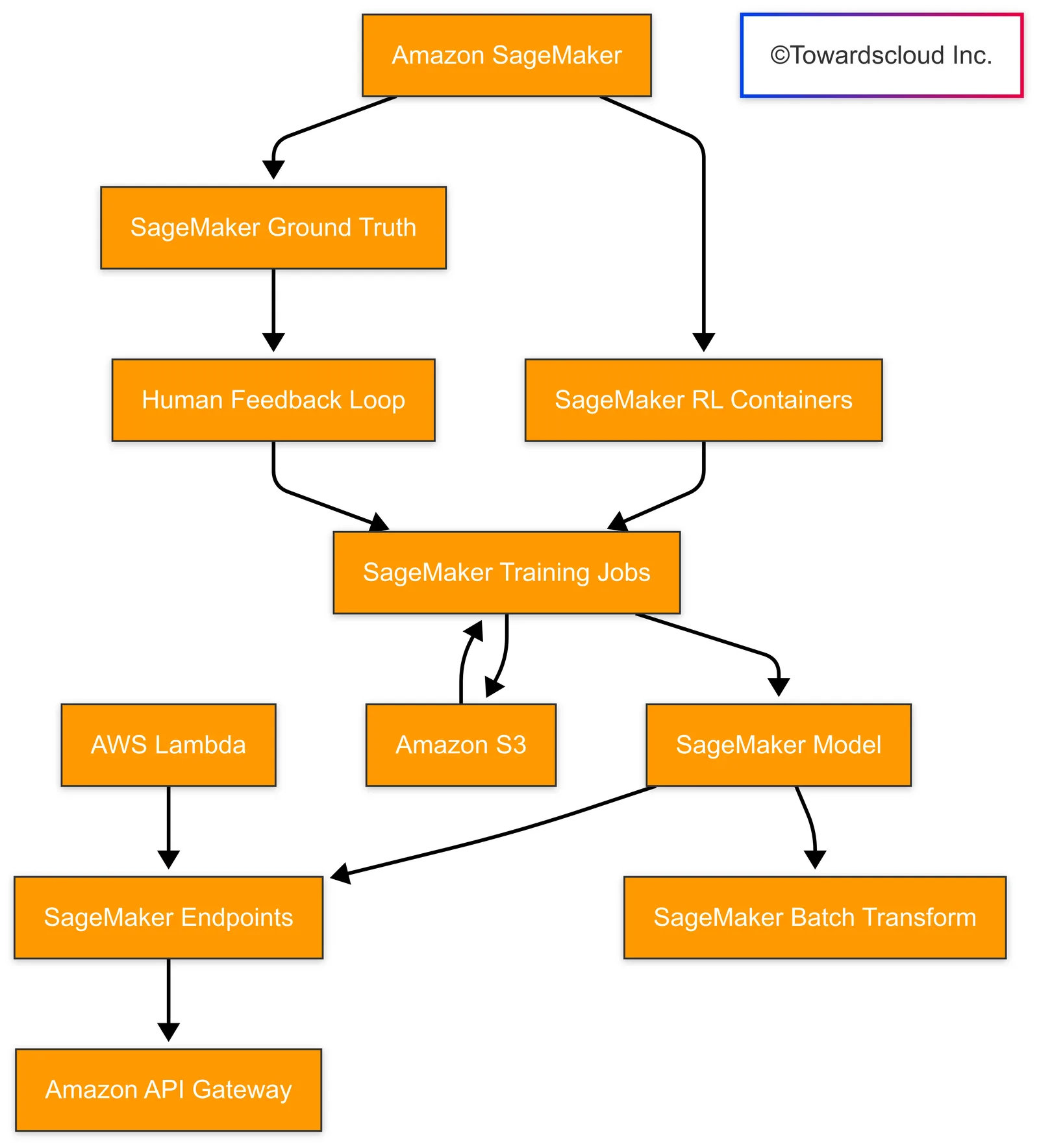
AWS offers several services that facilitate the implementation of RLHF for generative AI applications:
import boto3
import json
from transformers import pipeline

class AWSWordUpBot:
    def __init__(self):
        # Initialize AWS services
        self.sagemaker = boto3.client('sagemaker')
        self.s3 = boto3.client('s3')
        self.comprehend = boto3.client('comprehend')

        # Initialize the base model
        self.model_endpoint = "word-up-base-model"

    def enhance_text(self, input_text):
        # Use SageMaker endpoint for inference
        response = self.sagemaker.invoke_endpoint(
            EndpointName=self.model_endpoint,
            Body=json.dumps({"text": input_text})
        )
        return json.loads(response['Body'].read())['enhanced_text']

    def collect_feedback(self, original_text, enhanced_text, user_rating):
        # Store feedback in S3 for future training
        feedback_data = {
            "original": original_text,
            "enhanced": enhanced_text,
            "rating": user_rating
        }
        self.s3.put_object(
            Bucket="word-up-feedback",
            Key=f"feedback/{int(time.time())}.json",
            Body=json.dumps(feedback_data)
        )

    def retrain_model(self):
        # Launch SageMaker training job for RL fine-tuning
        self.sagemaker.create_training_job(
            TrainingJobName="word-up-rlhf-training",
            AlgorithmSpecification={
                "TrainingImage": "123456789012.dkr.ecr.us-west-2.amazonaws.com/rlhf-training:latest",
                "TrainingInputMode": "File"
            },
            RoleArn="arn:aws:iam::123456789012:role/SageMakerRole",
            InputDataConfig=[
                {
                    "ChannelName": "training",
                    "DataSource": {
                        "S3DataSource": {
                            "S3DataType": "S3Prefix",
                            "S3Uri": "s3://word-up-feedback/feedback/",
                            "S3DataDistributionType": "FullyReplicated"
                        }
                    }
                }
            ],
            OutputDataConfig={
                "S3OutputPath": "s3://word-up-models/output/"
            },
            ResourceConfig={
                "InstanceType": "ml.p3.2xlarge",
                "InstanceCount": 1,
                "VolumeSizeInGB": 50
            },
            StoppingCondition={
                "MaxRuntimeInSeconds": 86400
            }
        )
Key AWS Components:
- Amazon SageMaker: Handles model training, deployment, and inference
- Amazon S3: Stores feedback data and model artifacts
- Amazon Comprehend: Provides additional NLP capabilities for text analysis
- AWS Lambda: Can be used for serverless processing of feedback
GCP Implementation
Google Cloud Platform provides a robust ecosystem for implementing RLHF:
from google.cloud import aiplatform
from google.cloud import storage
from vertexai.language_models import TextGenerationModel

class GCPWordUpBot:
    def __init__(self):
        # Initialize GCP services
        self.storage_client = storage.Client()
        self.bucket = self.storage_client.bucket("word-up-feedback")
        aiplatform.init(project="word-up-project")

        # Initialize the base model
        self.model = TextGenerationModel.from_pretrained("text-bison@001")

    def enhance_text(self, input_text):
        # Use Vertex AI for text enhancement
        response = self.model.predict(
            prompt=f"Enhance the following text: {input_text}",
            temperature=0.2,
            max_output_tokens=1024
        )
        return response.text

    def collect_feedback(self, original_text, enhanced_text, user_rating):
        # Store feedback in GCS
        feedback_data = {
            "original": original_text,
            "enhanced": enhanced_text,
            "rating": user_rating
        }
        blob = self.bucket.blob(f"feedback/{int(time.time())}.json")
        blob.upload_from_string(json.dumps(feedback_data))

    def retrain_model(self):
        # Create Vertex AI custom training job for RL fine-tuning
        job = aiplatform.CustomTrainingJob(
            display_name="word-up-rlhf-training",
            script_path="train.py",
            container_uri="gcr.io/word-up-project/rlhf-training:latest",
            requirements=["transformers", "torch"],
            model_serving_container_image_uri="gcr.io/word-up-project/rlhf-serving:latest"
        )

        model = job.run(
            dataset=aiplatform.Dataset("projects/word-up-project/datasets/feedback"),
            model_display_name="word-up-enhanced",
            machine_type="n1-standard-8",
            accelerator_type="NVIDIA_TESLA_T4",
            accelerator_count=1
        )
Key GCP Components:
- Vertex AI: Manages end-to-end ML workflows
- Cloud Storage: Stores training data and model artifacts
- BigQuery: Can be used for large-scale analysis of feedback data
- Cloud Functions: Enables serverless processing of feedback
- Dataflow: Handles data preprocessing pipeline
Azure Implementation
Microsoft Azure provides comprehensive services for implementing RLHF:
from azure.ai.ml import MLClient, command
from azure.ai.ml.entities import Model, Environment
from azure.storage.blob import BlobServiceClient
from azure.ai.textanalytics import TextAnalyticsClient
from azure.core.credentials import AzureKeyCredential

class AzureWordUpBot:
    def __init__(self):
        # Initialize Azure services
        self.blob_service = BlobServiceClient.from_connection_string("connection_string")
        self.container = self.blob_service.get_container_client("word-up-feedback")
        self.text_analytics = TextAnalyticsClient(endpoint="endpoint", credential=AzureKeyCredential("key"))

        # Initialize ML client
        self.ml_client = MLClient.from_config()

        # Initialize the model endpoint
        self.endpoint_name = "word-up-endpoint"

    def enhance_text(self, input_text):
        # Call Azure ML endpoint for text enhancement
        endpoint = self.ml_client.online_endpoints.get(name=self.endpoint_name)
        response = self.ml_client.online_endpoints.invoke(
            endpoint_name=self.endpoint_name,
            request_file={"text": input_text},
            deployment_name="word-up-deployment"
        )
        return response["enhanced_text"]

    def collect_feedback(self, original_text, enhanced_text, user_rating):
        # Store feedback in Blob Storage
        feedback_data = {
            "original": original_text,
            "enhanced": enhanced_text,
            "rating": user_rating
        }
        self.container.upload_blob(
            name=f"feedback/{int(time.time())}.json",
            data=json.dumps(feedback_data)
        )

    def retrain_model(self):
        # Create Azure ML training pipeline for RL fine-tuning
        command_job = command(
            code="./src",
            command="python train.py --feedback-container word-up-feedback",
            environment=Environment(
                image="mcr.microsoft.com/azureml/rlhf-training:latest",
                conda_file="./environment.yml"
            ),
            compute="aml-cluster",
            display_name="word-up-rlhf-training"
        )

        returned_job = self.ml_client.jobs.create_or_update(command_job)
        self.ml_client.jobs.stream(returned_job.name)
Key Azure Components:
- Azure Machine Learning: Handles training and deployment
- Azure Blob Storage: Stores feedback data and model artifacts
- Azure Text Analytics: Provides NLP capabilities
- Azure Functions: Enables serverless processing
- Azure Data Factory: Manages data preprocessing pipelines
Cloud Implementation Comparison
| Feature | AWS | GCP | Azure |
|---|---|---|---|
| Base Model Services | SageMaker JumpStart, Bedrock | Vertex AI PaLM API | Azure OpenAI Service |
| Training Infrastructure | SageMaker Training Jobs | Vertex AI Training | Azure ML Compute |
| Deployment Options | SageMaker Endpoints | Vertex AI Endpoints | Azure ML Endpoints |
| Storage Solutions | S3 | Cloud Storage | Blob Storage |
| Serverless Computing | Lambda | Cloud Functions | Azure Functions |
| Analytics | Comprehend, Kinesis | Natural Language API | Text Analytics |
| Cost Efficiency | Medium | High | Medium |
| Integration Ease | Good | Excellent | Very Good |
| Documentation Quality | Excellent | Good | Very Good |
Challenges and Best Practices
Common Challenges in RLHF Implementation
- Reward Hacking: Models may find ways to maximize rewards without actually improving output quality
- Feedback Quality: Poor or inconsistent human feedback can lead to suboptimal training
- Computational Resources: RLHF typically requires significant computational resources
- Bias Amplification: Reinforcement can potentially amplify existing biases in the model
Best Practices
- Diverse Feedback Sources: Collect feedback from a diverse set of evaluators
- Robust Reward Models: Design reward models that capture multiple dimensions of quality
- Staged Training: Start with simpler preference models before full RLHF implementation
- Regular Evaluation: Continuously evaluate model outputs against human preferences
- Hybrid Approaches: Consider combining RLHF with other techniques like RLAIF (Reinforcement Learning from AI Feedback)
Example: a front end for an RLHF text enhancer
A tool like Word Up! Bot shows where human feedback enters the loop. Its interface would need three parts:
Key Features
- Text Input and Enhancement
- Clean input area to paste text
- Enhancement button that triggers the process
- Loading animation to indicate processing
- Result Visualization
- Clear display of enhanced text
- Side-by-side comparison showing improvements in:
- Grammar
- Vocabulary
- Clarity
- Feedback Collection System
- Four-level rating scale (Not Helpful to Very Helpful)
- Optional comment field for specific feedback
- Submission confirmation
Conclusion
Reinforcement Learning from Human Feedback represents a powerful approach for aligning generative AI models with human preferences and values. All three major cloud providers offer robust solutions for implementing RLHF, each with unique strengths:
- AWS provides the most comprehensive machine learning ecosystem with strong enterprise integration
- GCP offers excellent integration with other Google AI services and potentially lower costs
- Azure provides seamless integration with Microsoft’s productivity stack and strong enterprise features
The optimal choice depends on your specific requirements, existing cloud infrastructure, budget constraints, and team expertise. Regardless of the platform chosen, implementing RLHF can significantly improve the alignment, safety, and usefulness of your generative AI applications.
Part 20 of 30 · Introduction to Generative AI
- 01Introduction to Generative AI: What Is It?
- 02The History of Generative AI: From Concept to Reality
- 03Key Definitions and Concepts in Generative AI
- 04Pioneers of Generative AI: Meet the Inventors
- 05Understanding Neural Networks: The Backbone of AI
- 06Deep Learning Basics: Layers and Learning Rates
- 07Generative vs. Discriminative Models: What's the Difference?
- 08Overview of Generative Models: VAEs, GANs, and More
- 09Introduction to Variational Autoencoders (VAEs): From Basics to Advanced Applications
- 10Introduction to Generative Adversarial Networks (GANs)
- 11The Role of Transformers in Generative AI
- 12Applications of Generative AI in Everyday Life
- 13Ethical Considerations in Generative AI: Navigating the New Frontier
- 14Generative AI in Art and Music: The Creative Revolution
- 15Case Study: AI-Generated Artwork
- 16Generative AI in Text Generation
- 17Exploring OpenAI's GPT Models: Word Up! Bot
- 18Real-World Use Cases: Deepfakes and Their Impact
- 19Generative AI in Image and Video Synthesis
- 20Introduction to Reinforcement Learning in Generative AI
- 21The Future of Generative AI: Trends to Watch
- 22Generative AI in Healthcare: Opportunities and Challenges
- 23Generative AI in Finance: Risk Modeling and Beyond
- 24Generative AI in Marketing and Personalization
- 25Cloud Services for Generative AI: AWS Offerings
- 26Cloud Services for Generative AI: GCP Offerings
- 27Cloud Services for Generative AI: Azure Offerings
- 28Comparing Cloud Platforms for Generative AI
- 29Recap and Q&A: Introduction to Generative AI
- 30Building Your First Generative AI Model: A Practical Guide