Exploring GCP Compute Engine Instances
Exploring GCP Compute Engine Instances "Infrastructure is no longer just a cost center — it's a competitive differentiator. And nowhere is that more visible than in how you choose, configure, and optimize your virtual machines.

“Infrastructure is no longer just a cost center — it’s a competitive differentiator. And nowhere is that more visible than in how you choose, configure, and optimize your virtual machines.”
Whether you’re a startup running your first API server or an enterprise processing petabytes of data, Google Cloud’s Compute Engine is likely somewhere in your infrastructure story. It’s the foundational layer of Google Cloud Platform (GCP) — a fully customizable Infrastructure-as-a-Service (IaaS) offering that lets you spin up virtual machines (VMs) in seconds, choose from a rich menu of machine families, and scale elastically with your workload.
But Compute Engine is no longer just “pick a size, pay by the hour.” In 2026, it’s a sophisticated ecosystem of machine families, storage options, networking configurations, and pricing models — powered by Google’s latest silicon, including its own Axion ARM-based processors and next-generation TPUs.
This blog takes you through everything you need to know about GCP Compute Engine — from the fundamentals to the latest 2026 announcements from Google Cloud Next ‘26.
1. What Is GCP Compute Engine?
Google Cloud Compute Engine is Google’s Infrastructure-as-a-Service (IaaS) product. It provides scalable, high-performance virtual machines (VMs) that run in Google’s global data centers. Unlike managed platforms such as App Engine or Cloud Run, Compute Engine gives you raw infrastructure — full OS access, configurable hardware, and control over networking, storage, and security.
Think of it as renting physical hardware in a Google data center, but with the flexibility of software. You define the CPU, RAM, storage, GPU, and network configuration. Google handles the physical host maintenance, hardware redundancy, and global connectivity.
Why Compute Engine?
-
Full OS control — Bring your own OS or choose from a curated marketplace
-
Custom machine types — Mix and match vCPUs and RAM to your exact need
-
Global infrastructure — Deploy across 40+ regions worldwide
-
Google-grade networking — Benefit from Google’s private fiber backbone
-
Live migration — VMs are migrated without downtime during host maintenance
-
Tight GCP integration — Works natively with GKE, BigQuery, Cloud Storage, and more
2. Core Concepts and Architecture
Before diving into machine types, let’s ground ourselves in the core vocabulary of Compute Engine.
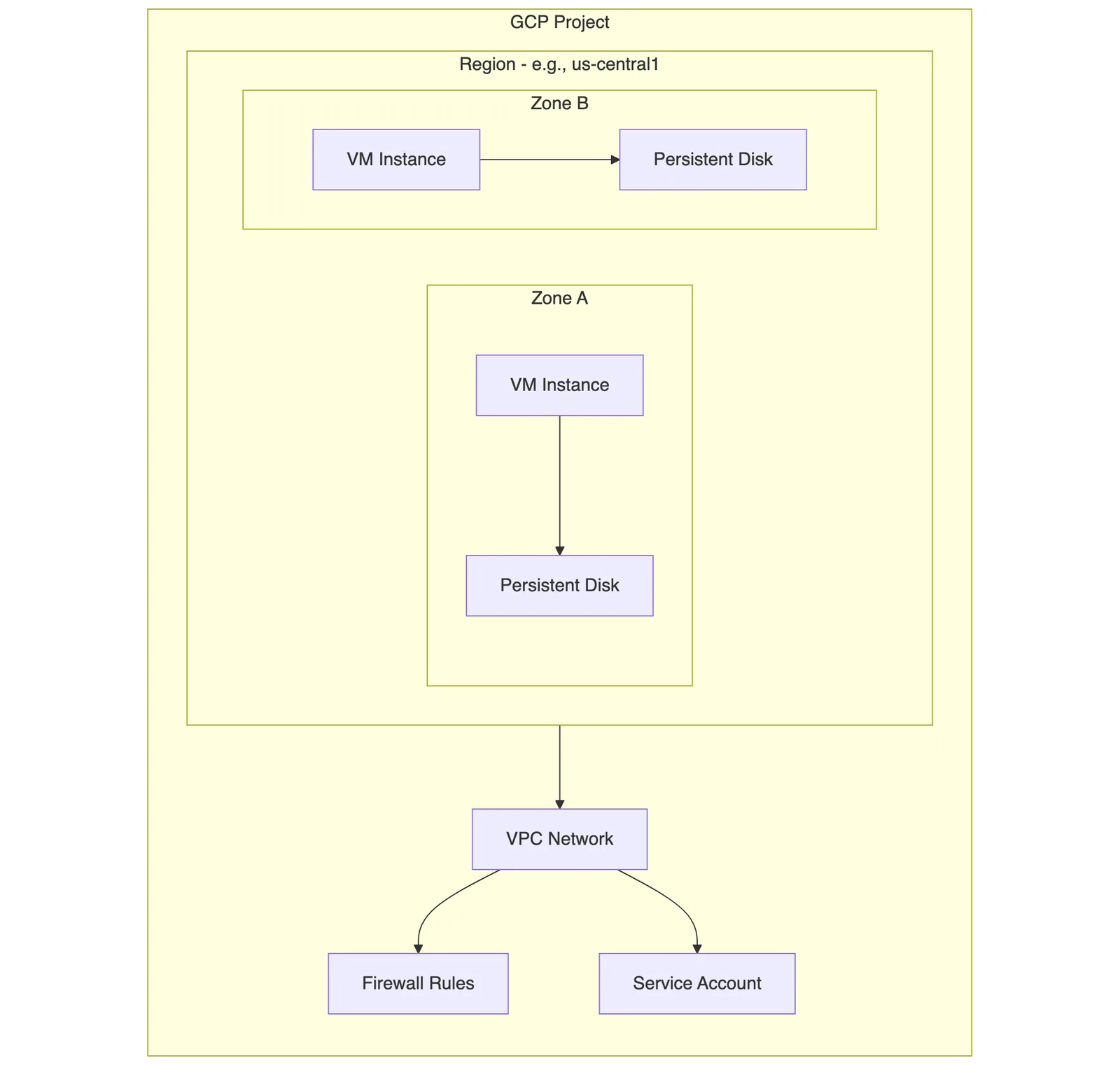
Key Concepts
Concept | Description |
|---|---|
Instance | A single virtual machine running on Google's infrastructure |
Machine Type | A predefined or custom combination of vCPUs, memory, and GPU |
Zone | An isolated deployment area within a region (e.g., |
Region | A geographic location containing multiple zones (e.g., |
VPC | Virtual Private Cloud — the software-defined network connecting your VMs |
Persistent Disk | Durable block storage attached to a VM, independent of its lifecycle |
Preemptible / Spot VM | Short-lived, deeply discounted VMs for fault-tolerant workloads |
Instance Template | A reusable configuration for creating VMs or managed instance groups |
Managed Instance Group | A fleet of identical VMs, auto-scaled and self-healing |
The VM Lifecycle
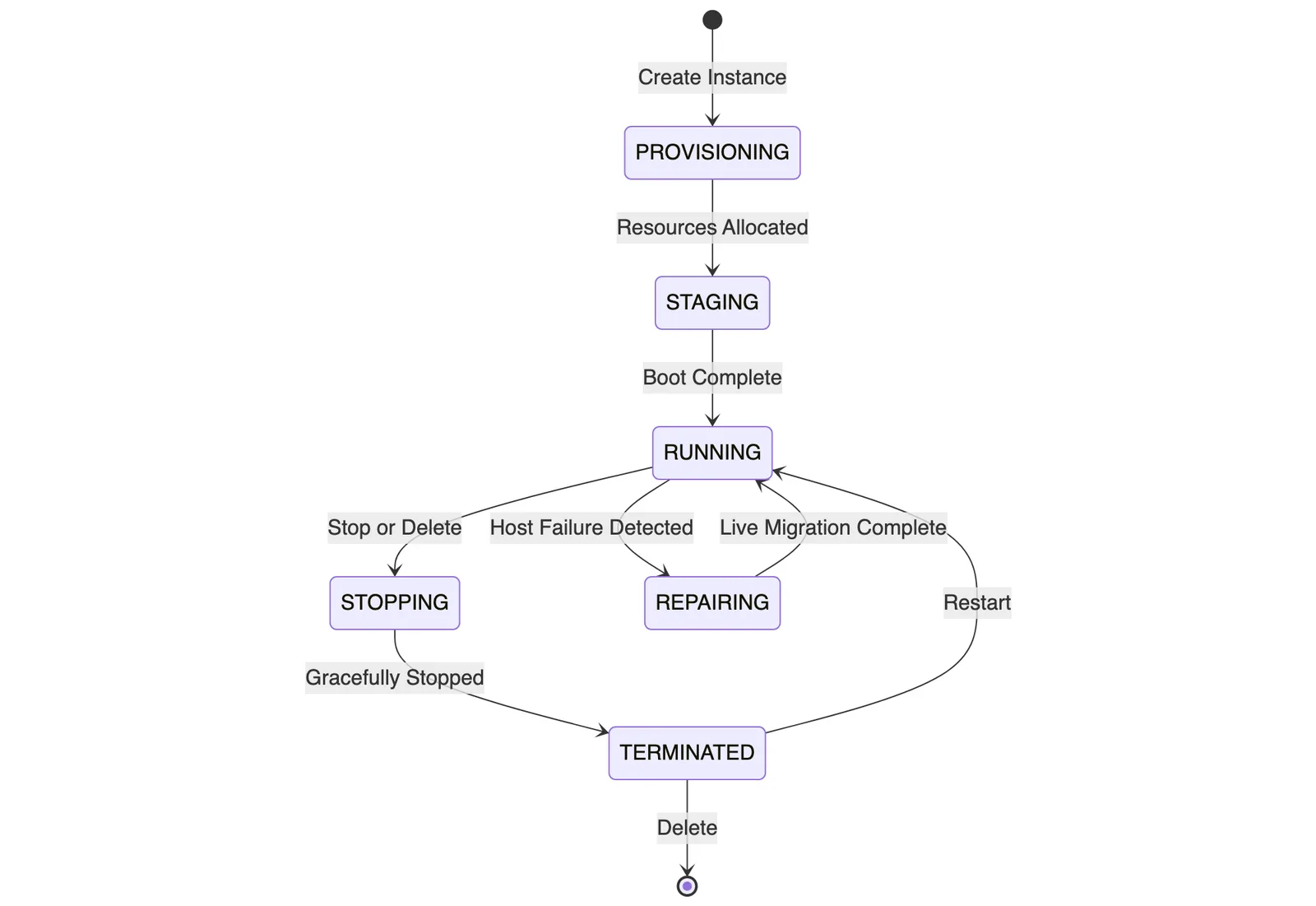
Understanding the VM lifecycle is critical for cost management — you’re only billed for compute while the instance is in RUNNING state (though disk storage is billed regardless of VM state).
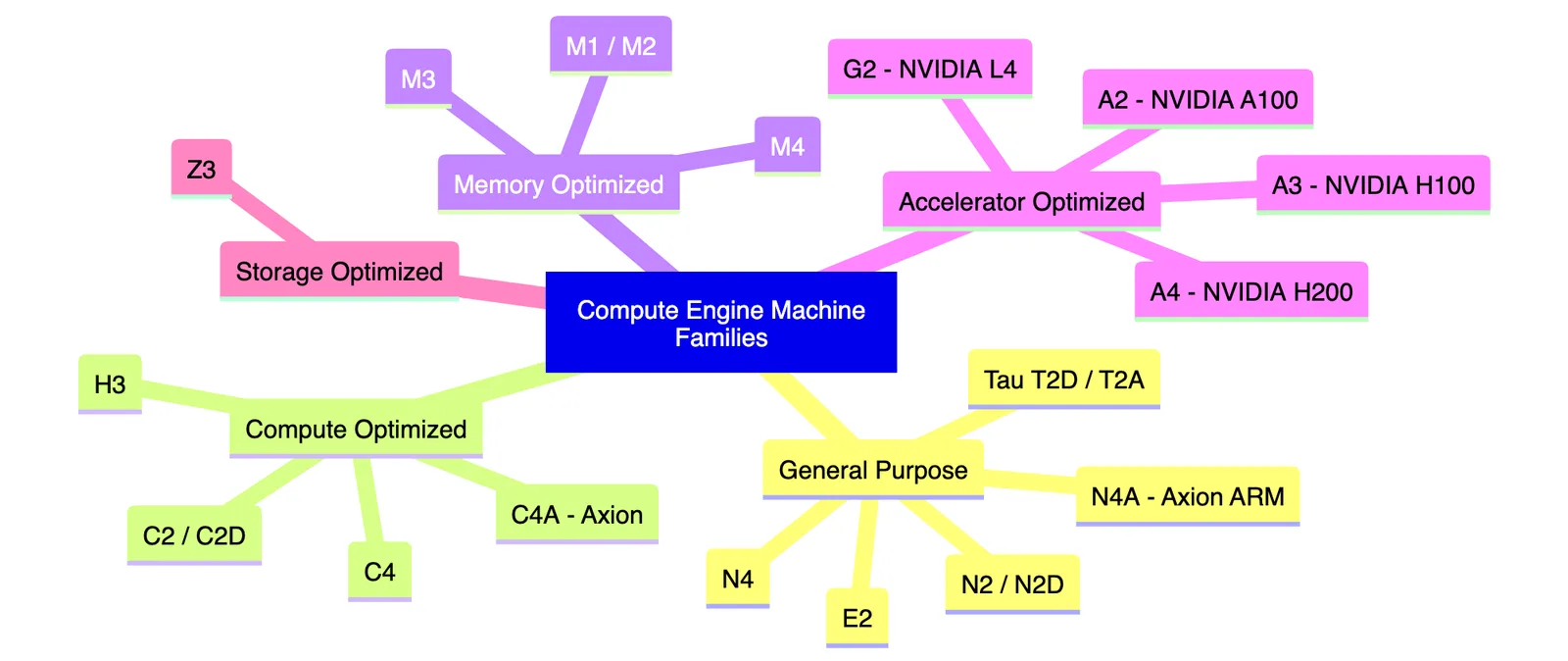
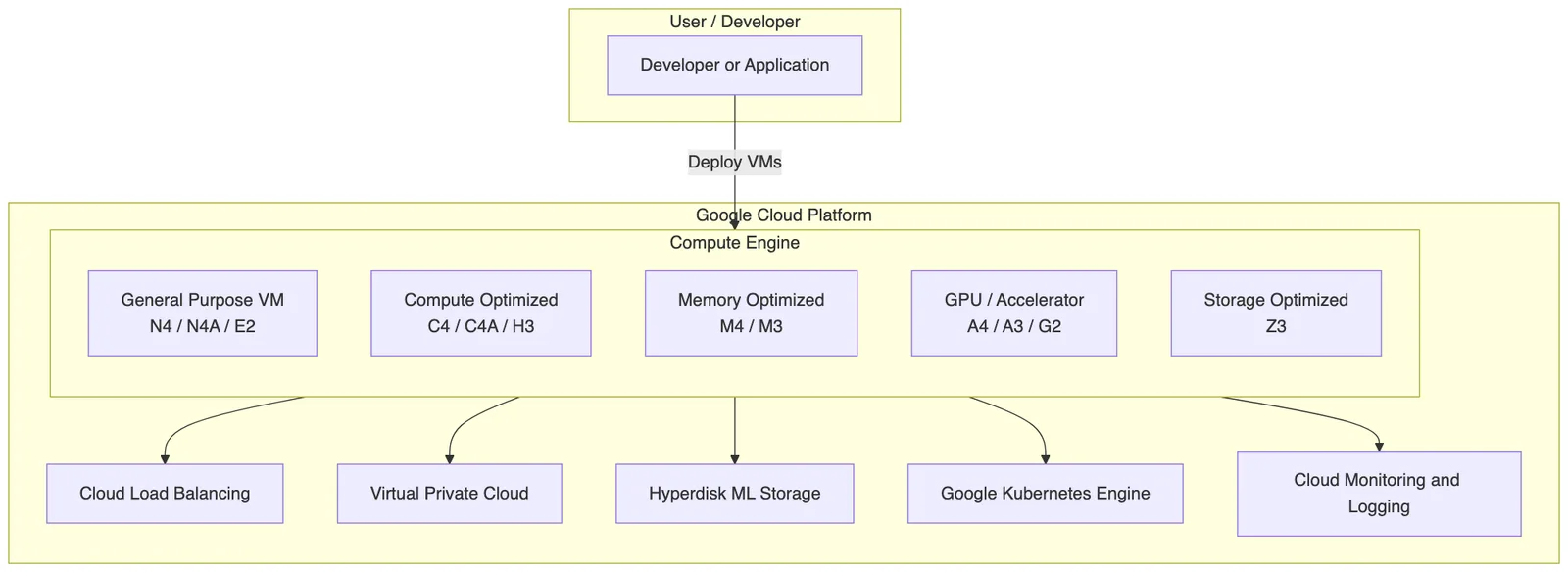
3. Machine Families at a Glance
GCP organizes its VM offerings into machine families — logical groupings based on workload characteristics. Each family is optimized for a particular dimension: compute, memory, storage, or acceleration.
4. Deep Dive: Machine Types Explained
4.1 General Purpose — The Workhorse
General-purpose VMs are the most versatile and cost-effective option. They’re designed for a broad range of workloads — web servers, dev environments, databases, and business applications.
E2 — Best Value
The E2 family uses shared-core and standard configurations with a flexible CPU platform. It’s Google’s most economical general-purpose option.
-
vCPUs: 2 to 32
-
Memory: Up to 128 GB
-
Best for: Low-traffic web apps, dev/test, small databases
N2 / N2D — Balanced Performance
N2 uses Intel Cascade Lake or Ice Lake, while N2D uses AMD EPYC processors. Both offer a strong balance of price and performance for production workloads.
-
vCPUs: Up to 128 (N2), up to 224 (N2D)
-
Memory: Up to 864 GB
-
Best for: Production web servers, mid-tier databases, enterprise apps
N4 — Latest Generation Intel
The N4 series, powered by Intel Emerald Rapids, is Google’s newest general-purpose family offering up to 30% better performance per dollar than N2.
-
vCPUs: Up to 208
-
Memory: Up to 1,404 GB
-
Best for: Enterprise workloads, high-throughput applications
N4A — Google Axion ARM-Based New in 2026
The N4A is powered by Google’s proprietary Axion processor — an ARM-based chip designed specifically for cloud workloads. It delivers exceptional price-performance for scale-out workloads.
At Google Cloud Next ‘26, Unity reported a 20% improvement in cost efficiency by migrating on-demand feature processor workloads to N4A instances 4 — without any performance sacrifice.
-
Architecture: ARM64 via Google Axion
-
Best for: Scale-out microservices, batch workloads, cost-sensitive production
4.2 Compute Optimized — When CPU Is King
These machines deliver the highest vCPU performance per core and are designed for CPU-bound workloads.
C4 — Intel Emerald Rapids
C4 instances are tuned for high single-threaded performance. They use Intel’s 5th Gen Xeon Scalable processors and support Hyperdisk for extreme I/O.
-
vCPUs: Up to 192
-
Memory: Up to 1,536 GB
-
Best for: High-frequency trading, game servers, scientific computing
C4A — Axion-Powered Compute Optimized New in 2026
The C4A brings Google’s Axion ARM silicon to compute-optimized workloads, offering superior throughput per dollar for parallelizable compute tasks 4.
H3 — Intel Sapphire Rapids for HPC
H3 instances are purpose-built for High-Performance Computing (HPC). They use Intel Sapphire Rapids and support high-bandwidth MPI networking.
-
Network: Up to 200 Gbps via Google’s Jupiter network fabric
-
Best for: Fluid dynamics, molecular modeling, seismic analysis
4.3 Memory Optimized — For Data-Hungry Workloads
When your application needs to hold massive datasets in RAM — think SAP HANA or in-memory caching — memory-optimized VMs are the answer.
M3 — Balanced Memory Giant
-
vCPUs: Up to 128
-
Memory: Up to 3.84 TB
-
Best for: Large in-memory databases, OLAP engines
M4 — Ultra-High Memory New in 2026
The M4 family was announced at Cloud Next ‘26, offering the largest available memory configurations on GCP 2.
-
Memory: Up to 6 TB+
-
Best for: SAP HANA scale-up, large Redis clusters, real-time analytics
4.4 Accelerator Optimized — GPU and AI Powerhouses
This is where Compute Engine shines for AI/ML workloads. Google has rapidly expanded its GPU-accelerated VM lineup.
G2 — NVIDIA L4 for Inference
G2 instances come with NVIDIA L4 GPUs — energy-efficient chips optimized for AI inference, video transcoding, and light training.
-
GPUs: 1 to 8x NVIDIA L4
-
Best for: Real-time inference APIs, video processing pipelines
A3 — NVIDIA H100 for Large Model Training
A3 instances are powered by NVIDIA H100 SXM5 GPUs and are designed for demanding LLM training and large-scale ML research.
-
GPUs: Up to 8x NVIDIA H100
-
NVLink: Up to 900 GB/s inter-GPU bandwidth
-
Best for: Foundation model training, large-scale HPC
A4 — NVIDIA H200 — Cutting Edge in 2026
The A4 series, featuring NVIDIA H200 GPUs, is Google’s newest accelerator instance. H200 GPUs pair the H100 compute engine with next-generation HBM3e memory, delivering superior memory bandwidth critical for LLM inference.
-
GPUs: Up to 8x NVIDIA H200
-
Memory Bandwidth: Up to 4.8 TB/s per GPU
-
Best for: LLM serving, multimodal model training, frontier AI research
4.5 Storage Optimized — Z3
The Z3 family is purpose-built for storage-intensive workloads requiring high-throughput local NVMe storage.
-
Local NVMe: Up to 108 TB per VM
-
Best for: Distributed file systems, large-scale Kafka/Cassandra clusters, analytics data lakes
5. What’s New in 2026 — Cloud Next ‘26 Announcements
Google Cloud Next ‘26 (April 2026) brought a wave of Compute Engine announcements. Here’s a curated summary of what matters most:
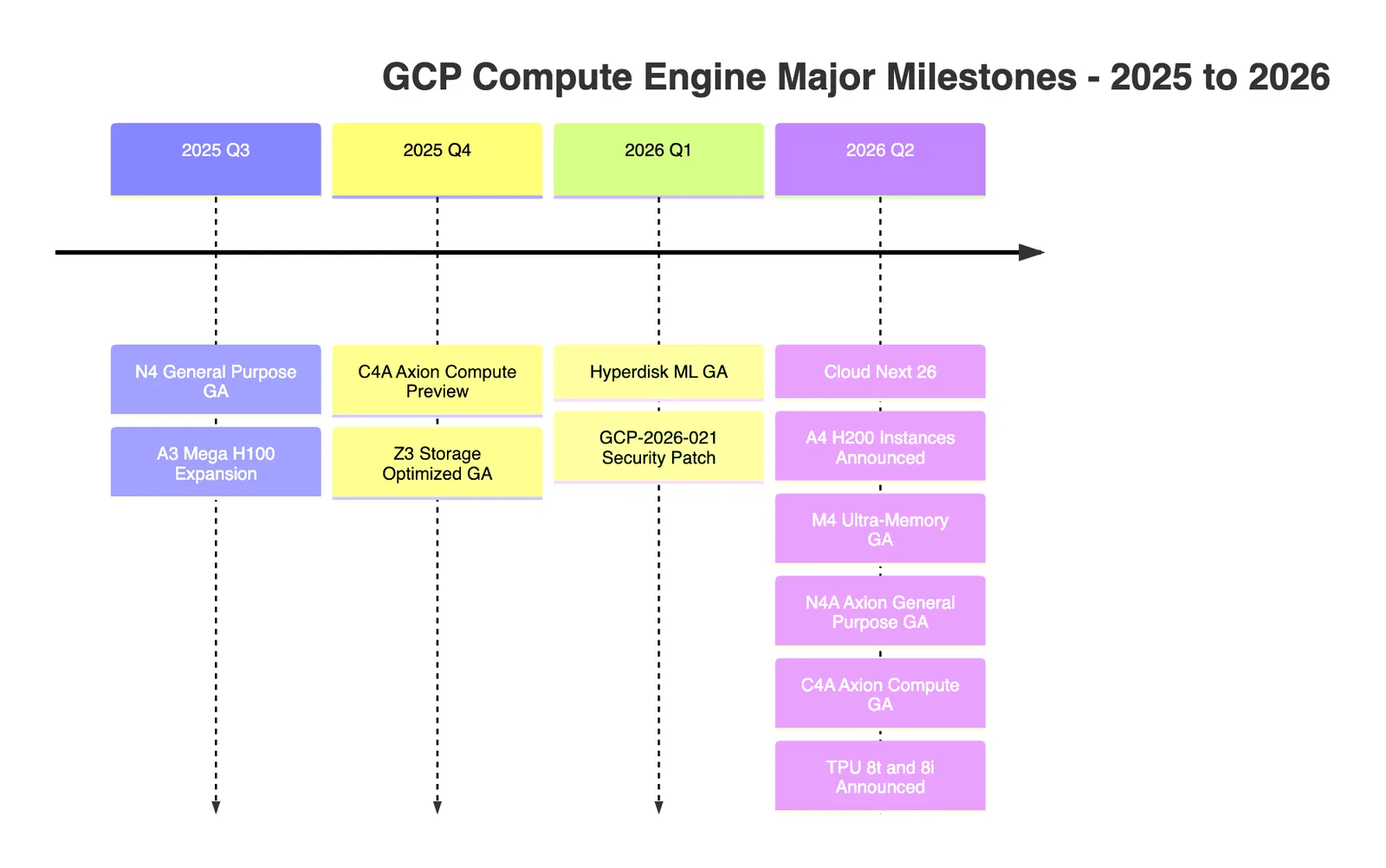
Key Announcements 249
Announcement | What It Means |
|---|---|
A4 — NVIDIA H200 Instances | Next-gen GPU VMs for frontier AI workloads with H200 SXM5 GPUs |
N4A — Google Axion GA | ARM-based general-purpose VMs now generally available |
C4A — Axion Compute GA | ARM compute-optimized VMs with competitive price-performance |
M4 — Ultra-Memory | Largest in-memory VM configurations available on GCP |
Hyperdisk ML — GA | High-throughput storage purpose-built for ML model serving |
TPU 8t / 8i | New TPU configurations for training and inference workloads |
GCP-2026-021 Security Bulletin | Critical security patch for Compute Engine instances 1 |
6. Storage: Persistent Disks and Hyperdisk ML
Storage is inseparable from compute. Compute Engine supports a tiered storage portfolio.

Hyperdisk ML — The Game Changer for AI Serving
The Generally Available release of Hyperdisk ML 1 is arguably the most impactful storage announcement of 2026. Here’s why it matters:
When serving large language models, the bottleneck is often not compute but how fast you can load model weights into GPU memory. Hyperdisk ML is engineered specifically for this:
-
Designed for: Multi-VM concurrent reads of large model checkpoints
-
Throughput: Dramatically higher than standard Persistent Disk for sequential reads
-
Use Case: Loading a 70B parameter LLM across a fleet of A3/A4 GPU VMs
Storage Comparison
Storage Type | IOPS | Throughput | Durability | Best For |
|---|---|---|---|---|
Standard PD | Up to 3,000 | 180 MB/s | 99.999% | Boot disks, low-cost storage |
Balanced PD | Up to 80,000 | 1,200 MB/s | 99.999% | General workloads |
Extreme PD | Up to 120,000 | 2,400 MB/s | 99.999% | Databases, latency-sensitive |
Hyperdisk Extreme | Up to 350,000 | 5,000 MB/s | 99.999% | Tier-1 databases |
Hyperdisk ML | Optimized for reads | Very high sequential | 99.999% | AI model serving |
Local SSD | Up to 2.4M | 2,400 MB/s | Ephemeral | Scratch, cache |
7. Networking and VPC Integration
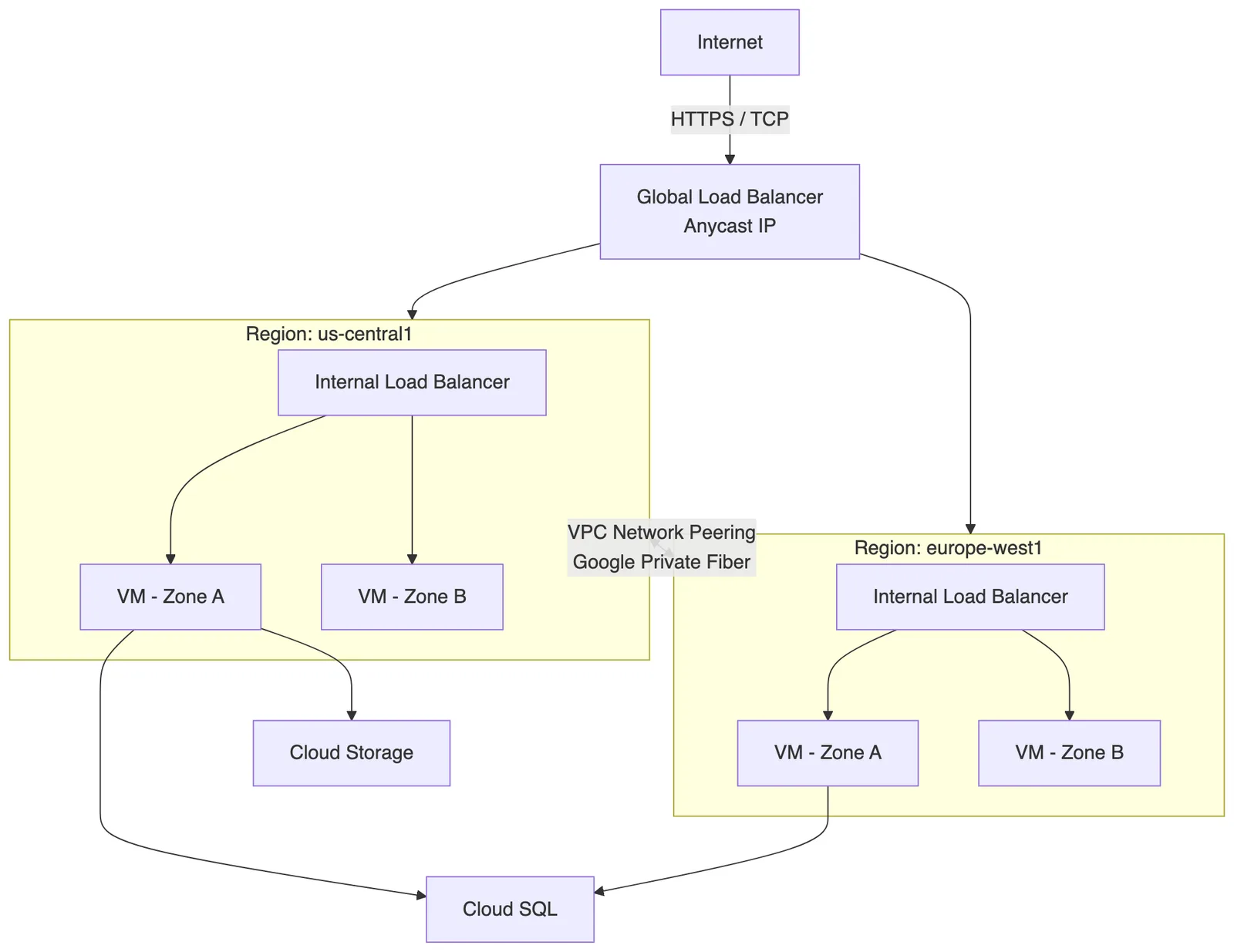
Every Compute Engine VM lives inside a Virtual Private Cloud (VPC) network. GCP’s networking layer is one of its strongest differentiators.
Key Networking Features
-
Global VPC: Unlike AWS, GCP VPCs are global — a single VPC spans all regions, eliminating cross-region peering complexity
-
Andromeda SDN: Google’s software-defined networking layer that provides consistent low-latency VM-to-VM communication
-
Cloud CDN + Global Load Balancing: Serve traffic from the edge closest to users with a single anycast IP
-
Private Google Access: VMs without external IPs can still reach Google APIs over Google’s private network
-
Network Bandwidth: N4 and C4 VMs support up to 100 Gbps egress; H3 HPC instances support 200 Gbps
8. Pricing Models and Cost Optimization
Understanding GCP’s pricing model is essential for avoiding bill shock and maximizing value.
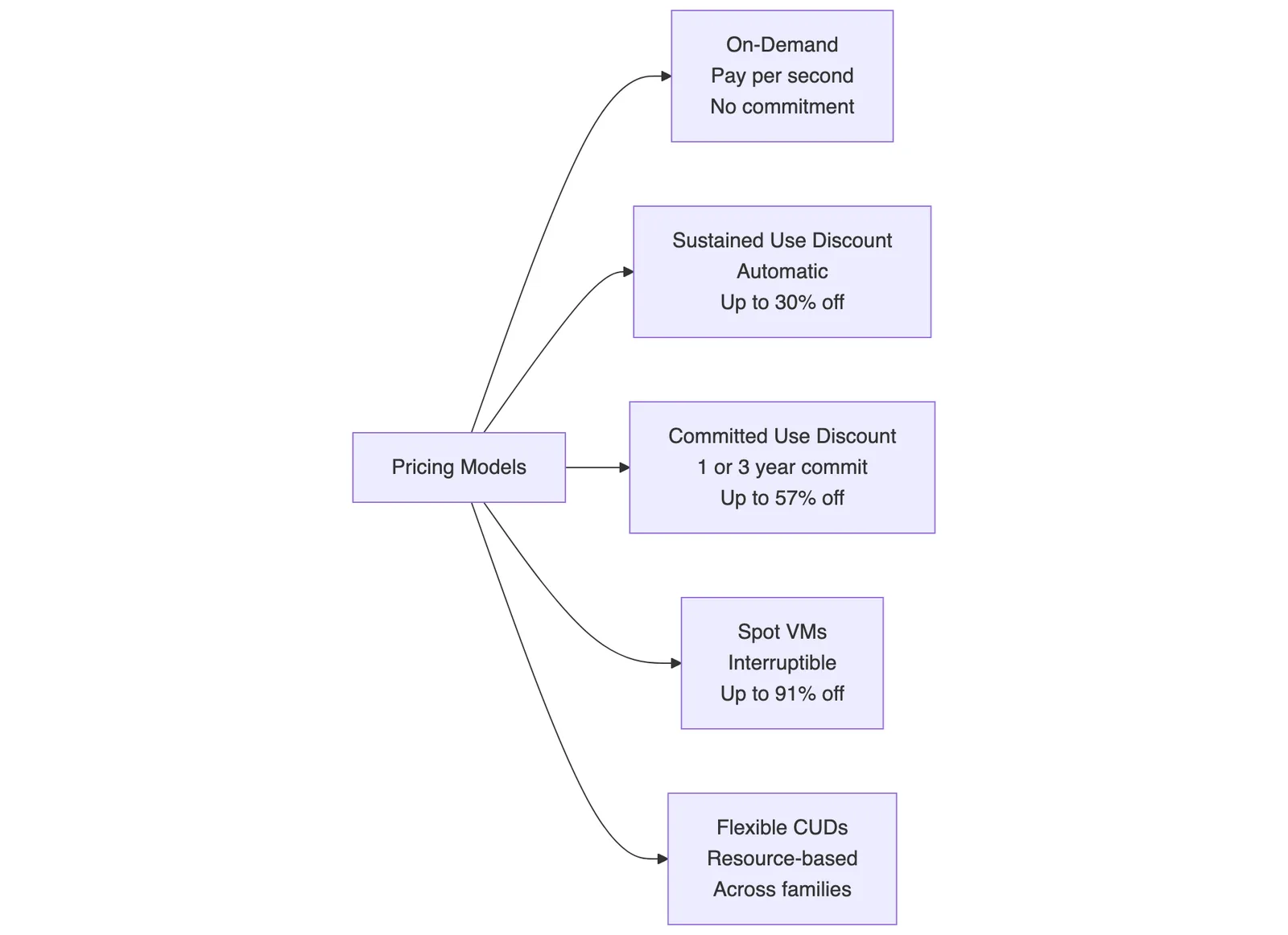
Pricing Models Overview
Worked Example: N4 Standard VM Cost Calculation
Let’s say you’re running an n4-standard-16 (16 vCPUs, 64 GB RAM) in us-central1 for a full month.
Assumptions (illustrative pricing):
-
On-demand rate: ~$0.76/hour
-
Hours in a month: 730
On-Demand Cost:
$0.76 × 730 = **$
With 30% Sustained Use Discount (automatic, kicks in at 25%+ monthly usage):
$554.80 × 0.70 = **$ — you save $166.44 just by running continuously
With 1-Year Committed Use Discount (~37% off on-demand):
$554.80 × 0.63 = **$ — you save $205.28/month
With 3-Year CUD (~57% off on-demand):
$554.80 × 0.43 = **$ — you save $316.24/month
Note: Actual prices vary by region, machine type, and current GCP pricing. Always verify on the GCP Pricing Calculator.
Spot VMs — When 91% Savings Makes Sense
Spot VMs are preemptible instances that can be reclaimed by Google with a 30-second notice. They’re ideal for:
-
Batch data processing (BigQuery ETL, Dataflow)
-
CI/CD build pipelines
-
Distributed ML training with checkpointing
-
Rendering farms
Cost Example:
A c4-standard-8 Spot VM might cost ~$0.08/hour vs. ~$ on-demand — a saving of **~85%**
$0.08 × 730 = **$ vs. $0.55 × 730 = **$ Savings: $343.10/month per VM
N4A Cost Efficiency in Practice
Migrating from N2 to N4A (Axion) for eligible workloads can deliver significant savings. Unity’s real-world migration to N4A instances 4 showed a 20% cost reduction on feature processor workloads.
Illustrative calculation for a 50-VM fleet:
Current monthly cost on N2: $10,000 After N4A migration: $10,000 × 0.80 = **$ Annual savings: $24,000
Rightsizing and License Costs
GCP Compute rightsizing tooling now includes license cost recommendations as of April 2026 10, helping FinOps teams understand the true total cost of ownership of Windows or RHEL VMs when rightsizing.
9. Security and Compliance
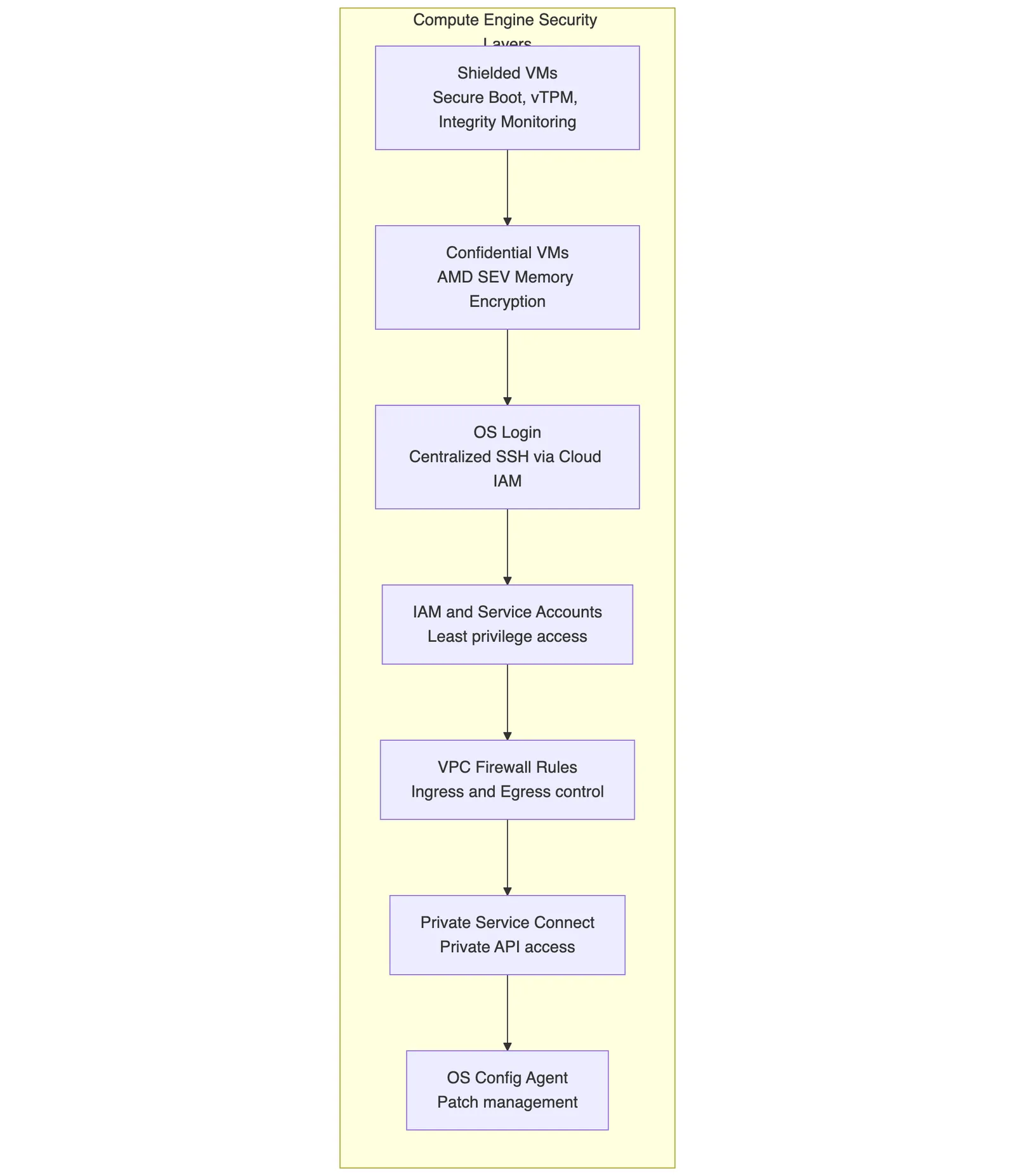
Security is baked into Compute Engine at multiple layers.
Key Security Features
-
Shielded VMs: Protect against rootkits and boot-level malware using Secure Boot, a virtual TPM, and integrity monitoring
-
Confidential VMs: Encrypt VM memory in-use using AMD Secure Encrypted Virtualization (SEV) — data is protected even from Google
-
OS Login: Replace SSH keys with centralized IAM-based access control — revoke access instantly via IAM policy
-
GCP-2026-021 Security Bulletin: A critical vulnerability affecting Compute Engine instances was identified and patched in early 2026 1 — ensure your VMs are on the latest OS images
Compliance Certifications
GCP Compute Engine maintains compliance with major frameworks including SOC 1/2/3, ISO 27001/27017/27018, PCI DSS, HIPAA, FedRAMP High, and GDPR controls.
10. Best Practices for Compute Engine
10.1 Rightsizing Your VMs
Over-provisioning is the #1 cause of cloud waste. Use Cloud Monitoring and Recommender to:
-
Identify VMs running at <40% average CPU utilization
-
Review memory high-water marks in Cloud Monitoring
-
Apply rightsizing recommendations — often saving 20–40% per VM
10.2 Use Managed Instance Groups (MIGs)
Never manage individual VMs at scale. MIGs give you:
-
Autoscaling: Scale based on CPU, memory, HTTP load, or custom metrics
-
Autohealing: Automatically replace unhealthy VMs using health checks
-
Rolling updates: Deploy new VM images without downtime
-
Multi-zone distribution: Spread VMs across zones for resilience
10.3 Choose the Right Storage Tier
-
Don’t use Extreme PD for low-IOPS workloads — pay only for what you need
-
Use Hyperdisk Balanced for most production databases
-
Reserve Hyperdisk ML for AI model serving scenarios
-
Detach unused persistent disks — you’re billed for allocated storage, not used storage
10.4 Implement Cost Governance
-
Apply Labels to every VM (e.g.,
env=production,team=platform) for cost attribution -
Enable Budget Alerts before spending exceeds thresholds
-
Use Committed Use Discounts for baseline capacity, Spot VMs for burst
-
Leverage Cloud FinOps tooling or third-party platforms for rightsizing recommendations 10
10.5 Leverage Live Migration
GCP’s Live Migration automatically moves your running VM to a healthy host during hardware maintenance — with no reboot required. This is a default behavior for most VM families. Ensure your VM metadata does not disable it unless you have GPU workloads requiring maintenance policies.
10.6 Network Optimization
-
Use Tier 1 networking for premium egress performance when low latency matters
-
Enable GVNIC (Google Virtual NIC) on supported instances for higher bandwidth and lower CPU overhead compared to VirtIO
-
Place VMs in the same region as their data sources (Cloud SQL, GCS) to minimize latency and egress costs
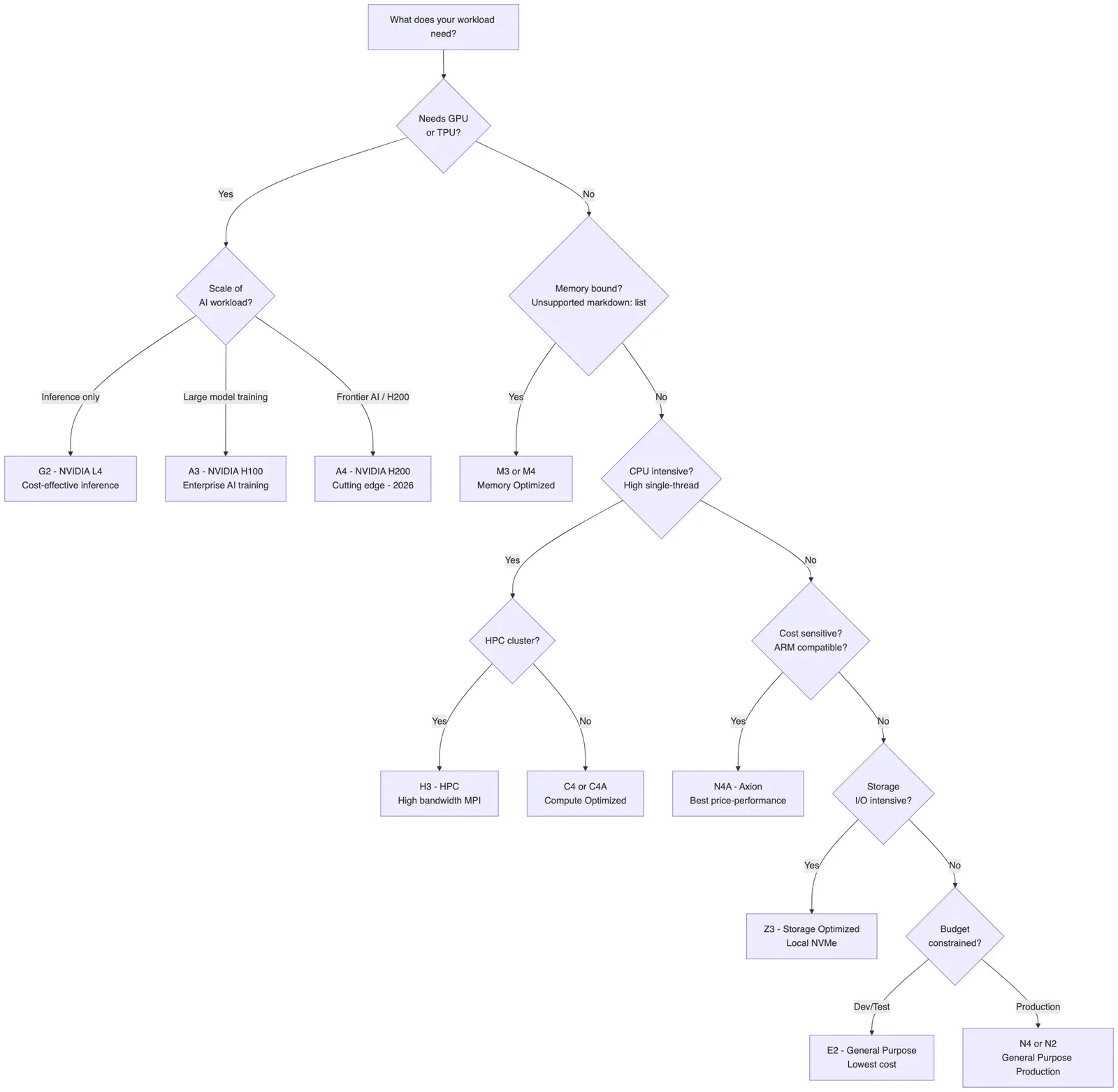
11. Choosing the Right Instance: A Decision Framework
Quick Reference Decision Table
Workload Type | Recommended Family | Why |
|---|---|---|
Web servers, APIs | E2 / N4A | Cost-efficient, scalable |
Production databases | N4 / C4 + Hyperdisk Balanced | Balanced compute and I/O |
SAP HANA, in-memory DB | M3 / M4 | Up to 6 TB+ RAM |
LLM Inference | G2 / A3 | L4 for cost, H100 for scale |
LLM Training - Frontier | A4 | NVIDIA H200, maximum throughput |
HPC - Simulations | H3 | High-bandwidth MPI networking |
Batch, CI/CD | E2 Spot / N4A Spot | Up to 91% savings |
Big Data - Kafka, Cassandra | Z3 | 108 TB local NVMe |
AI Model Serving | A3/A4 + Hyperdisk ML | Fast model weight loading |
12. Real-World Use Cases
12.1 Serving a Production Web Application
Stack: N4A MIG (3–20 VMs) + Global Load Balancer + Cloud SQL
-
Deploy an N4A standard-8 Managed Instance Group with autoscaling
-
Use a Global HTTP(S) Load Balancer with SSL termination
-
Store session data in Memorystore (Redis)
-
Achieve 99.99% availability across 2 zones with autohealing
Cost estimate (10 average VMs, 1-year CUD):
10 VMs × $X per VM with CUD ≈ significant savings vs. on-demand
12.2 Training a Large Language Model
Stack: A3 (8x H100) cluster + Hyperdisk ML + GCS for checkpoints
-
Provision an A3 Ultra cluster using MIGs with placement policies for low-latency GPU interconnect
-
Use Hyperdisk ML for fast checkpoint loading across all nodes
-
Store training data in Cloud Storage with parallel reads
-
Use Spot A3 instances for pre-training phases with frequent checkpointing
12.3 Running SAP HANA
Stack: M4 Ultra + Hyperdisk Extreme + 3-year CUD
-
Select M4 for maximum available memory (6 TB+)
-
Attach Hyperdisk Extreme for high-IOPS database I/O
-
Apply a 3-year Committed Use Discount for maximum savings on this long-lived workload
-
Enable Shielded VM features for enterprise compliance
12.4 Real-Time Analytics Pipeline
Stack: Z3 (Kafka brokers) + N4A (Flink processors) + BigQuery Sink
-
Run Apache Kafka on Z3 instances leveraging local NVMe for ultra-low broker latency
-
Process streams on N4A Flink workers for cost-efficient compute
-
Sink processed data to BigQuery using the Kafka BigQuery Connector
-
Scale Flink workers using Spot N4A VMs for cost efficiency
13. Final Thoughts
GCP Compute Engine in 2026 is a testament to how far cloud computing has come. What started as simple virtual machines has evolved into a rich, intelligent, and highly specialized portfolio of compute resources — from sub-cent Spot E2 micro instances to multi-GPU A4 clusters powered by NVIDIA H200 chips, all connected by Google’s world-class private fiber network.
Key Takeaways
-
Match your machine to your workload — the right family can cut costs by 30–90% over a generic choice
-
Use the pricing model pyramid — On-Demand for flexibility, CUDs for baseline, Spot for burst
-
Embrace Axion (N4A / C4A) — Google’s ARM-based silicon is production-ready and delivering measurable cost gains 4
-
Hyperdisk ML changes AI serving — fast model loading is now a first-class infrastructure concern 1
-
Security is not optional — patch your instances following GCP security bulletins and use Shielded + Confidential VMs for sensitive data
-
FinOps is a continuous practice — rightsize, label, commit, and review regularly 10
The pace of innovation at Google Cloud shows no signs of slowing down. As AI workloads become central to every business, Compute Engine’s accelerator family will only grow more important. But don’t overlook the quiet revolution happening in general-purpose compute — the Axion-powered N4A and C4A instances represent a genuine inflection point in price-performance for cloud VMs.
Stay current with the Compute Engine release notes and Google Cloud Blog to keep pace with the rapidly evolving landscape.
Sources: GCP Compute Engine Release Notes [1] · Google Cloud Next 2026 Wrap-Up [2] · What’s New in Compute at Next ‘26 [4] · GCP April 2026 Updates — Usage.ai [9] · Cloudability GCP Rightsizing — IBM [10]
Part 2 of 7 · Virtual Machines
- 01Deep Dive into AWS EC2 Instances
- 02Exploring GCP Compute Engine Instances
- 03Understanding Azure Virtual Machines
- 04Comparing VM Offerings Across AWS, GCP, and Azure
- 05Instance Types and Families Explained
- 06Pricing Models: On-Demand, Reserved, Savings Plans, and Spot
- 07Auto Scaling VMs on AWS, GCP, and Azure